· Ben · craft · 7 min
Content refresh strategy: fix the decayed post before you write a new one
Most blogs publish new posts while the old ones quietly bleed clicks. Here's how to spot decay in Search Console, decide whether today's slot goes to a refresh or a new post, and ship the fix as a diff instead of a date bump.
Open Search Console, filter to one page, set the range to sixteen months. Impressions are holding roughly flat. Clicks are sliding. Average position has drifted from 4 to 9 across two quarters and nothing dramatic happened on any single day.
Nothing is broken. That page is just losing, slowly, and the honest answer to "what should we publish today" is often not a new post at all. It's that page, rewritten, shipped as a diff.
Every content refresh strategy article on the first page of Google will tell you to audit, prioritize, and update. Then they go quiet exactly where the work happens: what changed, who reviewed it, and how you prove afterwards which edit moved the number. In a repo, all of that is free. Nobody has bothered to write it down.
The page isn't broken, it's losing
Decay has a fingerprint, and it isn't one number. Clicks down with impressions down and position worse is a ranking loss. Clicks down with impressions steady and position steady is a SERP-layout or CTR problem. Clicks down with impressions up is usually your page drifting onto queries it doesn't deserve. Search Engine Land's decay breakdown separates these properly, and the useful part is that free Search Console data is enough to tell them apart.
The detection rule I'd actually run: monthly clicks over six months for the trend line, plus a three-month year-over-year comparison of clicks, impressions and average position for the diagnosis. Three months smooths the noise out of a small blog. Ahrefs flags anything down more than 20% year over year at a quarterly review. Animalz triggers a refresh on a consistent decline of three months or more, where the page previously pulled meaningful organic traffic and accounts for at least 1% of your total content traffic.
You can do the whole thing in the GSC web UI with a spreadsheet. If you'd rather have it run itself, I wrote up finding your decayed posts with about 40 lines of Search Console API. Same query, sorted, on a schedule.
The math says refresh, and it isn't close
Ahrefs re-ran their page-age study in May 2025 across millions of URLs. 72.9% of pages in the top 10 are three years old or older. Pages under a year old make up 13.7%, down from 22% in the 2017 version of the same study. The average page ranking at #1 is five years old.
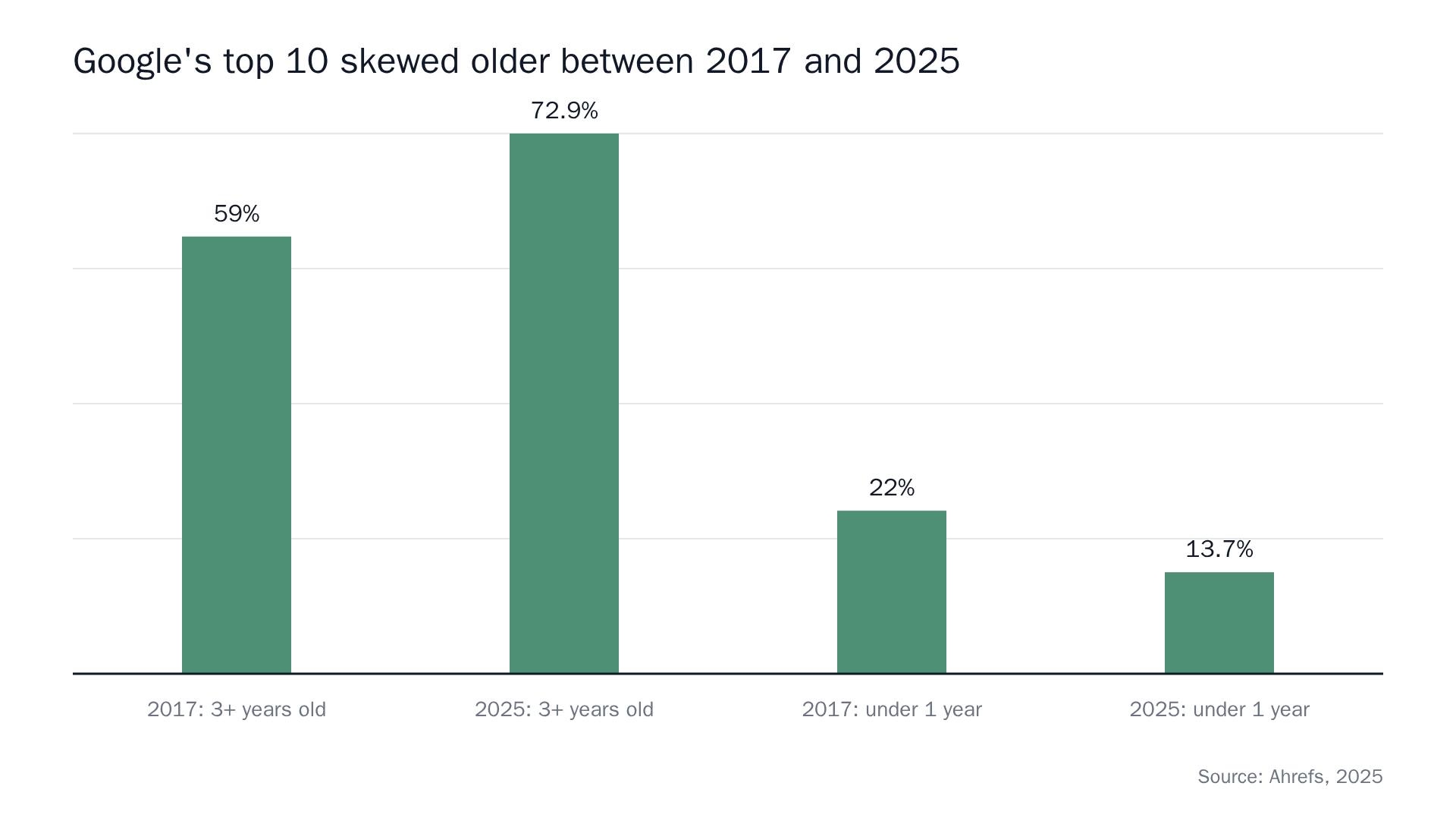 Sources: How Long Does It Take to Rank in Google? And How Old Are Top Ranking Pages?, 107 SEO Statistics for 2026.
Now the other half of the picture, from Ahrefs' own stats roundup: 96.55% of pages get zero organic search traffic from Google.
Put those together and the budget question answers itself. A new post is a lottery ticket with a documented 3.45% hit rate and a multi-year ramp. A decayed post sitting at position 9 already has index history, internal links, whatever external links it earned, and a proven query it once won. Moving it from 9 back to 4 is a shorter distance than moving a blank file to anywhere at all. Animalz's own numbers put the drop from #1 to #6 at roughly 90% of the traffic, which means the reverse trip is worth an absurd amount relative to the effort.
Refreshing is the short odds. Publishing is the long ones. Most content calendars are built entirely out of long odds because publishing feels like progress and refreshing feels like admitting the last thing you shipped stopped working.
Everyone quotes the same 2018 number
The awkward part: the refresh advice on that SERP has itself decayed.
The most-cited decay figure in the category is Animalz's analysis of AdEspresso's blog: an average of -1.21% traffic per week. That's from 2018. The canonical case study is HubSpot's historical optimization program, which nearly tripled monthly leads from old posts and raised monthly organic views on the optimized posts by an average of 106%. That's from 2016.
The 106% is a views number. At least one widely linked write-up of it restates it as a conversion rate increase. Nine years in transit and the metric changed on the way. Nobody lied. The number just got copied one hop too many with no source attached.
Same thing is happening right now with AI answer engines. "50% of AI citations come from content less than 13 weeks old" is on multiple blogs with no traceable primary study behind it. I went looking and couldn't find one. So it's not in this post as an argument, and it isn't in a chart either. This is the whole reason our figures print their source inside the image: a stat you can't walk back to its origin is decoration.
Carry the numbers you can trace. Cut the rest.
Bumping the date is not a refresh
Mueller has said this in public more than once. In a 2021 Search Central hangout: changing the publish date without changing content won't improve rankings, and "we definitely wouldn't rank those pages differently in search just because you're changing the date and time on a page." In 2019, on bylines: if an article has been substantially changed, giving it a fresh date makes sense, but don't artificially freshen a story without adding significant information.
Freshness weighting is query-dependent. "Best CI runner 2026" wants recency. "What is a bloom filter" does not. There's no universal bonus to collect.
The reason half the ranking advice still teaches the date trick is depressingly simple: in most publishing tools, the date is the only field that's easy to change. The tool shapes the tactic.
What "substantial" looks like as a number
Google says "significant changes" and stops. The category fills the gap by inventing one. I found a page asserting that Google's guidance is 20–30% of the text changed. That figure is not in any Google source I could find. Don't repeat it.
If your posts are files, you don't need a folk number. The diff is the measurement.
+142 −38 is a refresh. +2 −2 is a date bump wearing a costume. Nobody has to argue about whether the update was substantial, because git diff --stat already answered, and the answer is in the merge commit forever.
In a repo, the refresh is just another pull request
This is the part the rest of the category structurally can't say, because it assumes a live page being mutated in a CMS with no history.
A refresh in a git-backed blog is the same shape as a new post. A branch, contentcron/<slug> for us, a diff against the file that's already there, a PR description explaining what decayed and what changed, a review thread, a merge. Same surface your team already uses to review content the way you review code. The reason refresh never gets scheduled at most companies is that it feels like a different category of work than publishing. In a repo it isn't. It's a commit touching an older file.
You also get the two things the freshness guidance quietly implies you should have. git log path/to/post.mdx is a real change history, which means a dateModified in your frontmatter is a claim you can defend instead of a field you nudged. And git revert is your rollback, so a refresh that tanks a page costs you one command rather than an afternoon in a CMS revision viewer.
What you refresh, in order
Prioritize by absolute clicks lost, not percentage lost. A page down 60% from 30 clicks a year is not a project. As one of the few honest posts on that SERP puts it, a page with 30 clicks per year doesn't deserve four hours of work. It deserves a redirect or a delete.
Then, roughly in this order: expand where a competitor now covers a subtopic you don't. Replace dead statistics and stale product screenshots, which on a SaaS blog is usually the bulk of the rot. Re-cut the intro against what the query actually wants today, because intent moves faster than your outline. Merge two posts that are cannibalizing each other into one, and redirect the loser. Kill the pages that were never going to make it.
Refresh competes with new, daily
This is the part where I get concrete about our own product, because the queue is what turns the tradeoff from a nice idea into a real one.
Contentcron ships about one article a day. A refresh of a decayed post counts as an article. A new post counts as an article. PR-comment revisions don't count as anything. So the tradeoff shows up in the queue every morning. Today's slot goes to the decayed post or the new one, and you make that call in the topic queue.
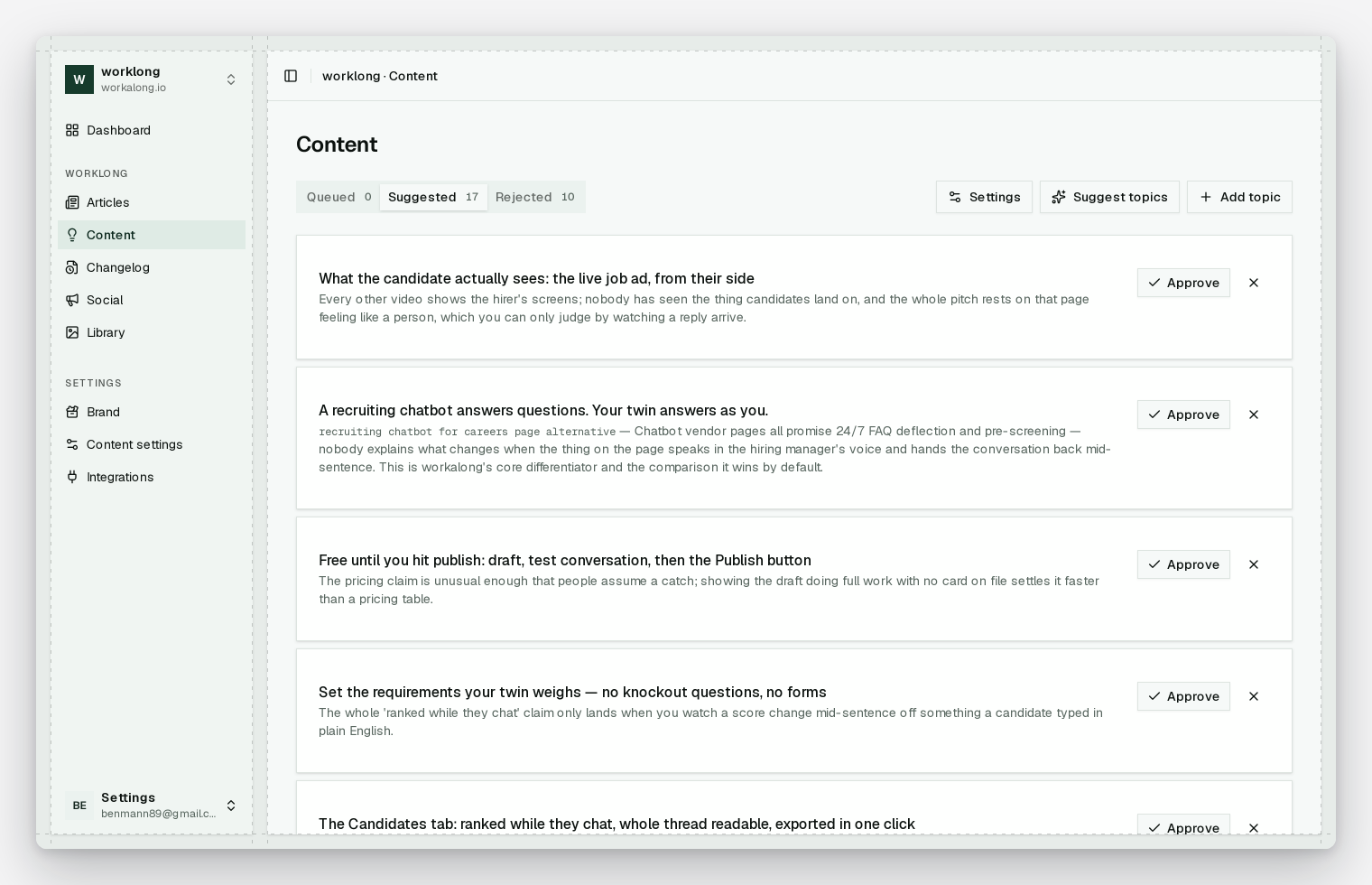
The ratio I'd defend on a blog with fifty-odd posts and a year of history: one refresh a week, four new posts. Under twenty posts, skip refreshing almost entirely. HubSpot's own caveat on historical optimization is that it only makes sense once you have a repository of old posts worth optimizing, and that caveat gets quoted about a thousandth as often as the 106%. Over a hundred posts, the ratio should probably flip, and most teams find that out two years late.
That's a heuristic, not a law. The queue is the thing that makes you look at it every single day, which is the actual mechanism. One a day beats fifty on a Tuesday for the same reason.
What this doesn't fix
A refresh won't rescue a post that never deserved to rank. If it peaked at position 34 and drifted to 61, that's not decay, that's a page that never had it. Rewriting it is sunk-cost work with a better mood.
It won't beat a genuine intent shift either. When the SERP for your query stops being articles and becomes tools, comparison tables or a product page, no amount of expansion converts your essay into the thing people now want. Different page, or no page.
It won't undo a site-wide quality problem. If everything is sliding at once, the individual post is not the unit of the problem.
And if your posts live in a database-backed CMS (Contentful, Sanity, WordPress), most of this post doesn't apply to you. There's no diff to read, no git log behind your modified date, no revert. You can still do the refresh, you just can't prove what changed, which is why the whole category writes about audits and never about evidence. That's a structural difference between git-based and headless setups, not a tooling preference.
If your blog is a folder of markdown and there's a Search Console tab nobody has opened since the last launch, start there. Sort by clicks lost, pick the worst one, and make the diff big enough to defend. Contentcron will do it on a schedule if you'd rather not — the first article is free, no card.