· Ben · craft · 6 min
Screenshots in your docs are lying
Capture was never the hard part. Here's how to keep documentation screenshots up to date automatically — detecting drift, shooting behind a login, and pixel-diffing so only real UI changes land in the repo.
A screenshot is the only artifact in your repo that can be wrong without being broken. A dead link 404s. A stale type signature fails the build. A renamed prop blows up at compile time. A PNG of a settings page that shipped two redesigns ago renders perfectly, passes CI, and teaches every reader a UI that no longer exists.
Search for how to keep documentation screenshots up to date automatically and you'll get a dozen good posts about headless browsers. Playwright, Capybara, TestCafe, shot-scraper. They all work. None of them answer the question that actually costs you money, which is: of the 400 images already committed to this repo, which ones are now lies?
That's the gap. Here's the whole problem, split the way it actually breaks.
Capture was never the hard part
The tooling is genuinely good and it has been for years. Simon Willison's shot-scraper wraps Playwright behind a CLI and a YAML manifest of shots; the first version was about 180 lines of Python, and the Datasette docs are illustrated by a GitHub Actions run that shoots the images and commits them back to a repo. Ubicloud drives Chrome through Capybara and cuprite, wrapping each capture in a database transaction so the seeded demo state rolls back afterwards. Camunda reused their existing TestCafe end-to-end runs to emit user-guide images, including a client-side function to compute element positions so shots could be cropped and highlighted consistently.
Three different stacks, three teams that solved capture in an afternoon and then wrote it up. Pick whichever one matches your language. You'll be done by lunch.
Then you'll have the real problem, which is that you now own a pile of binary files with no expiry date.
Knowing which image went stale is the other 80%
GitLab opened an issue about this in 2016. The framing was asset tracking, not capture: which docs reference which image, and how does anyone know when an image is deprecated. It's still open. Their docs style guide points authors at spec/docs_screenshots/*.rb and recommends Mermaid for diagrams, which tells you where the line got drawn — diagrams became source you can diff, screenshots stayed binaries someone has to look at.
Camunda's Optimize guide carried roughly 100 screenshots, and a manual refresh pass across them ran a day or two of work. Per release. They eventually stood up a separate repo whose only job is regenerating Modeler screenshots into the docs tree, and even then a human reviews the diff before it gets committed. That review step is the honest part of the whole setup. Someone still has to look.
You can't grep a PNG. Your linter doesn't know the sidebar moved. The only signal that an image has gone stale is a human noticing, and humans notice about four months late, usually because a customer emailed asking where the button in the screenshot went.
Regenerating everything nightly is not the fix
The obvious response is to re-shoot every image on a schedule and commit whatever comes out. Don't. A nightly full re-render churns binaries into git forever, your repo gains weight it never loses, and every unrelated docs PR arrives carrying forty modified images nobody can review. You've traded a silent-staleness problem for a noisy-diff problem, and the noisy one trains people to rubber-stamp.
The fix is a diff on the image, not on the doc. Compare the new capture against the last one and only write the file when something actually moved. Playwright exposes maxDiffPixels and maxDiffPixelRatio for exactly this, because naive pixel equality over-reacts: one row of anti-aliasing, a font rendering a hair differently on a new runner image, and every shot in the set comes back dirty. Disable animations, pin the fonts, set a tolerance, and the run goes quiet on the days nothing changed. That quiet is the whole product. When five images change, that's a real event, and it's worth reviewing the way you'd review a code change instead of scrolling past it.
Your app is behind a login, and half the tooling stops there
Screenshot-as-a-service vendors take a public URL and hand back a PNG. Your dashboard isn't a public URL. Which means the category can screenshot exactly one page you own: the marketing homepage, the single page you already look at every day and would notice going stale within a week.
Everything worth documenting is past a login. The engineering write-ups can get there because they're already inside a test suite that has a session — Ubicloud's capture code runs against a seeded account inside a transaction, Camunda's runs inside TestCafe. If you don't have an end-to-end suite, that path isn't open to you, and the vendor path can't reach your product. So the problem stays build-it-yourself, and it stays unbuilt.
What it actually takes: credentials stored encrypted, an account seeded to look like a real customer's, a script that walks the nav to reach the screen rather than deep-linking into a route that might not exist next quarter, and a schedule so drift gets caught by 0 6 * * * and not by a support ticket.
Demo data is a content problem, not an infra problem
The screenshots that embarrass you aren't blurry. They're the ones showing asdf@asdf.com, a project named test test, and an empty state with zero rows. An empty state is worse than no screenshot, because it tells the reader the product does nothing.
The seeded account has to look used. Realistic names, a plausible number of records, a chart with a shape to it. This is a writing job wearing an infrastructure costume, and it's the part that gets skipped because it doesn't belong to anyone on the platform team.
The stale screenshots that cost you aren't in /docs
Here's the thing every ranking article misses. Your /docs folder is the least rotten surface you own, because it has an owner, a style guide, and a review process. Someone's name is on it.
The images that have quietly gone wrong are in the launch post from March, the changelog entry announcing a feature that's since been redesigned, the comparison page a prospect will read before they ever open your docs. Nobody re-reads a blog post after it merges. There's no release cycle that forces a pass over it. And that content is often the first product screenshot a stranger ever sees.
If your blog is markdown in a repo, those images are sitting in the same git tree as your code with none of the maintenance code gets. That's the lane nobody's writing about, and it's the one I actually care about.
What I built, and what it won't do
Contentcron keeps a per-project asset library. It logs into your app with demo credentials you store encrypted, walks the nav, captures the screens, and tags each shot by feature so an article about billing gets the billing screen. Every capture is re-shot on a schedule and pixel-diffed against the last one. The URL stays stable, so a post published in March keeps pointing at the same asset and the image behind it updates only when your UI actually moved.
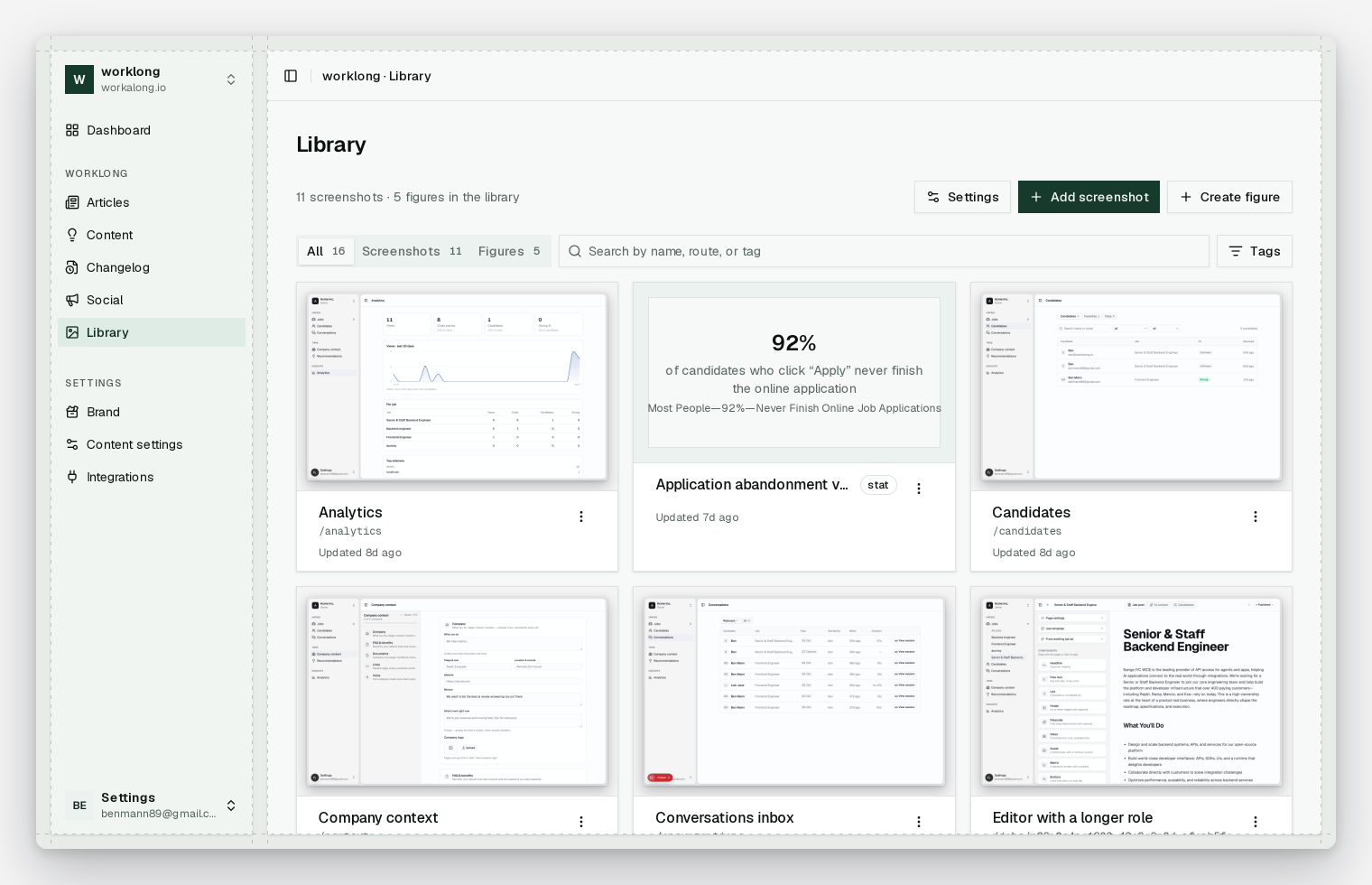
Now the refusals, in the same breath. There is no AI image generation, by design — an illustration that can't be traced to a real screen or a real source isn't evidence, it's decoration, and you can smell it instantly. The same rule governs figures: a chart that can't cite a source gets rejected outright. And this is not your end-to-end suite. It won't cover your API reference, it won't assert that the flow still works, and it won't tell you a button is broken. It captures what the product currently looks like so your content stops describing a product that doesn't exist. Different job.
Three things to do this week, whatever you use
Inventory first. Get a list of which pages reference which image files, because until you have that mapping, "this screenshot is stale" has no blast radius and no one can act on it. GitLab named this as the actual problem nine years ago and they were right.
Put capture behind one command. Not a wiki page of steps. One command, runnable by whoever's on rotation, seeded and deterministic.
Then set a cadence and a tolerance. Nightly, weekly, per release — pick one, add a pixel threshold so anti-aliasing doesn't page you, and let the schedule find drift instead of a customer.
If your blog and your docs are markdown files in a repo and the newest screenshot in either is older than your last redesign, this is the problem you have. Try Contentcron on one project — first article free, no card, and it arrives as a pull request with real screenshots of the product as it looks today.